| - New graphics |
| - Step-by-step kanji decomposition |
| - Expanded and improved Radical Info |
| - Renaming kanji and radicals |
| - Changes in "Joyo Kanji" list |
| - New dictionary data |
New graphics
The user interface in JiShop 6.0 has been rebuilt on AlphaControls graphical components, which support a variety of skins (also called themes or visual styles). The old JiShop skin, slightly modified, is used by default. The "View" section of the Main Menu contains more than 20 alternative built-in skins developed by AlphaControls designers. You can also completely switch off skinning; JiShop will then use your Windows default appearance.
 |
 |
 |
 |
 |
All the skin files (*.asz) are stored in the "skins" subfolder of the "Jishop" folder.
You can add a new skin file to this subfolder or delete the files you don't need.
Unfortunately, only skins in AlphaControls format are supported.
The user interface implementation has been slightly changed. For example, the selection of search decomposition depth has been moved
from the Main Menu to the "Search" box. Radical Info, phonetic dictionary and drill groups have their own menus now.
Setting kanji masks in the phonetic dictionary has been moved to the menu.
In the main window, Full-screen mode is now accessed via the standard Maximize button.
This feature has replaced the "Minimize to tray" button, which has been removed.
Step-by-step kanji decomposition
You can access this new feature from a dictionary entry by clicking on the
 button, using the pop-up menu,
or tapping the R shortcut key (the first letter of the word "Radicals").
button, using the pop-up menu,
or tapping the R shortcut key (the first letter of the word "Radicals").
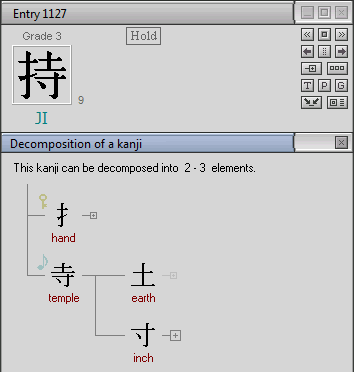
By default, step-by-step decomposition unfolds the internal structure of those radicals, which get split when the search depth is set to off or minimum. In all other cases, the radicals are accompanied with special symbols:
 The radical gets split at the maximum depth of the search.
 The radical gets split at the extra depth of the search.
 The radical never gets split at search.
Click on any of these symbols to unfold the structure of the respective radical. Click on the radical itself to see its
Radical Info.
Radicals that hold the function of a traditional key ("bushu") or sound component, are marked with the symbols of a key
and a musical note respectively. In some cases, two radicals, one of which contains the other, can both be marked as
sound components.
In the decomposition window, you can meet any of more than 1800 radicals contained in JiShop database (not just the 632 radicals
from the table in the main window). Radicals that are not included in the table are marked with red rhombuses.
Non-standard decompositions are not listed yet. This option will be added in later versions.
Step-by-step decomposition is also available for separate radicals. Call it from the Radical Info window with a menu command.
Expanded and improved Radical Info
Before the release of version 6.0, only the 632 radicals from the table in the main window had
Info. However, any combination of strokes combined in more than one kanji is considered a radical in JiShop,
and the total number of radicals is more than 1800. Now, all of them have a detailed Info.
At the moment, Radical Info for the radicals outside the table can be called from the decomposition window.
Starting with version 7.0, it will be also available from JiPad written input tool.
In JiShop 6.0, Radical Info for the 632 table radicals contain many more examples illustrating their usage,
many more comments, and links to other radicals, including those outside the table.
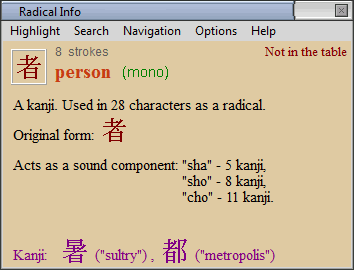
The functionality of Radical Info has been greatly expanded.
Renaming kanji and radicals
In version 6.0, you can change the basic meanings of characters and add new ones. Use the command "Rename" in the popup menu accessed by right-clicking on a dictionary entry, or in the Entry section of the menu in the main window. There are a variety of reasons why you might want to rename kanji. For example:
- The entry is not yet edited, and the basic meaning does not exist;
- You dislike the suggested basic meaning for some reason;
- The basic meaning covers only one semantic aspect of the kanji, but you want to reflect others, as well;
- You prefer a name in a language other than English.
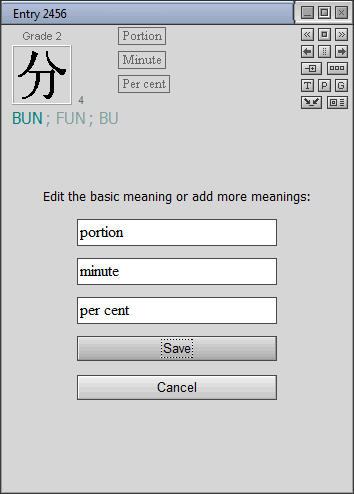
A similar function is also provided for radicals via the Options entry in the Radical Info menu, allowing you to give any radical a new name (English or/and Japanese). There are a variety of reasons why you might want to rename radicals. For example:
- The radical is not named;
- You have discovered another name for this radical somewhere (in a dictionary, textbook, etc.) and found it more appropriate;
- You have invented your own mnemonic trick for memorizing this radical and want to fix it in its name;
- You prefer a name in a language other than English.
Changes in Joyo Kanji list
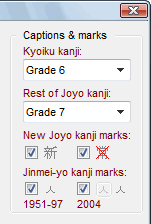
In 2010, the official "Joyo Kanji" list ("Kanji for daily use") was expanded
from 1945 to 2136 characters. JiShop utility grades are now modified to reflect these changes.
New characters included in the list are marked with the symbol  ("New"). Five characters removed from the list are marked with the symbol
  (the first kanji in the word "Joyo"). You can suppress the output of these symbols in the box
"Captions and marks" of the "Utility groups and search scope" window (hotkey: Ctrl-U).
(the first kanji in the word "Joyo"). You can suppress the output of these symbols in the box
"Captions and marks" of the "Utility groups and search scope" window (hotkey: Ctrl-U).
In the same box, you can choose how to specify the first 10 utility groups
(by words "Grade", "Level", "Class", by only digits, etc.). The word "Grade" is used by default.
New dictionary data
200 kanji entries have been edited, and 2500 compound words have been added to the phonetic dictionary. Now JiShop contains as many as 5000 fully edited kanji entries.
See also new features in version 6.1.
See also new features in versions 5.0 - 5.3.